
Authentication
The Mindrift API uses API keys to authenticate requests. You can create and manage your keys in the Mindrift dashboard.
Your API keys carry full access to your account’s enabled services and billing balance. Keep them secret and never share them in publicly accessible areas, client-side code or version control repositories.
Creating an API Key
To start making requests to the Mindrift API, you must generate an API key from your dashboard:
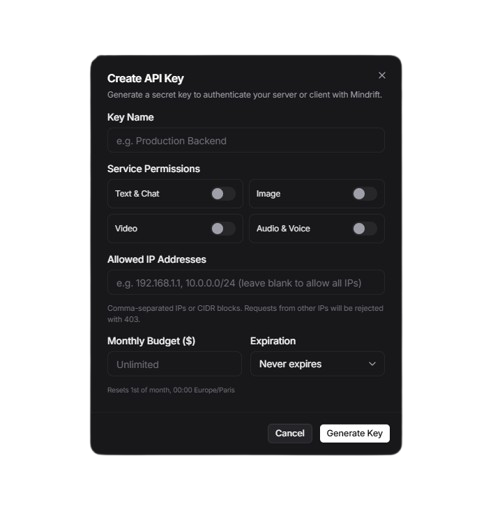
- Sign in to your account at platform.mindrift.art.
- Go to API Keys in the navigation menu.
- Click Create new key.
- Fill in the key configuration:
- Key Name: A descriptive label to identify where the key is used (e.g.
Production Backend,Staging Worker). - Service Permissions: Select the capabilities granted to this key: Text & Chat, Image, Video, or Audio & Voice. Requests targeting services not enabled for the key are rejected with a
403 Forbiddenerror. - Allowed IP Addresses (optional): Restrict requests to specific IPv4/IPv6 addresses or CIDR blocks (e.g.
192.168.1.50, 10.0.0.0/24). Requests from any other IP address are blocked. - Monthly Budget (optional) : Set a spending cap in USD for this specific key. The spend counter automatically resets on the 1st of every month at 00:00 Europe/Paris time.
- Expiration (optional): Set an automatic expiration window (30 days, 90 days, or 1 year), or choose never to expire.
- Copy and store your secret key immediately. For security reasons, the full key secret is only displayed once and cannot be retrieved later.
- Key Name: A descriptive label to identify where the key is used (e.g.
All live secret keys are prefixed with sk_to make them easy to recognize and scan in secret detection tools.
How Bearer Authentication Works
Every request to the Mindrift API must authenticate using standard HTTP Bearer token authentication.
The Authorization Header
Instead of passing credentials through URLs, cookies or body parameters, your API key must be transmitted in the HTTP request headers using the standard Authorization header field.
The header value consists of two parts separated by a single space:
- The scheme identifier: the exact word
Bearer - Your actual secret API key
Transport Security (HTTPS Required)
Because Bearer authentication tokens act as secret bearer credentials (meaning anyone who possesses the token is granted access), all API traffic must be encrypted in transit.
- The Mindrift API is served strictly over HTTPS at https://api.mindrift.art.
- Requests sent over unencrypted plain HTTP (http://) are rejected or redirected to HTTPS.
- Never disable SSL/TLS verification in your HTTP client library when communicating with the API.
Request Identification
Every API response includes an x-request-id header containing a unique UUID. Whenever you encounter unexpected authentication failures or need support, include this request ID in your inquiry to help our team trace the exact request in our access logs.
Authentication Errors
Authentication errors follow our standard JSON error structure:
-
Keep keys on the server: Store API keys exclusively on your secure backend servers. Never embed secret keys in frontend applications (React, Next.js client bundles, Vue, mobile apps or static web pages) as they can be extracted by anyone inspecting network traffic or application bundles.
-
Use environment variables: Inject keys into your runtime environment using environment variables (such as MINDRIFT_API_KEY) rather than hardcoding them into source files.
-
Set least-privilege permissions: When creating keys for specialized tasks (for example a microservice that only generates images), enable only the permissions that service actually needs.
-
Configure IP whitelisting: For production systems hosted on fixed servers or static IPs, restrict your API keys to those IP addresses to prevent unauthorized use if the key is accidentally leaked.
-
Rotate compromised keys immediately: If an API key is accidentally committed to a public repository or exposed in client logs, navigate to the API Keys dashboard, delete or suspend the compromised key immediately and issue a replacement.